Redesigning Kaboo: Secure onboarding and a playful dashboard that build trust, engagement, and subscriptions.
My Role
UX Designer
UI Designer
UX Auditor
Skills
Timeline
6 months
Industry
SaaS, B2C

Overview
The Context
When I first joined the Kaboo project, it wasn’t just another design challenge — it felt personal. Kaboo’s vision resonated with me: helping families separated by borders stay connected in a playful, heartfelt way. A digital space where kids could send handwritten-style cards to grandparents or cousins across the world.
But there was a problem.
Despite Kaboo’s heartwarming mission, parents were hesitating. Children weren’t reaching the playful dashboards Kaboo promised. Families dropped off before they even got started.
That’s when we realized — this wasn’t just a design flaw. This was a trust issue.
Project Overview
Kaboo is an early-stage startup creating a gamified, kid-friendly platform that helps globally dispersed families stay connected through handwritten-style digital cards. It offers a safe, asynchronous environment designed for playful, meaningful interaction.
As Kaboo scaled, it needed a secure, intuitive onboarding flow for parents, children, and guardians—one that felt age-appropriate and trustworthy, while also driving subscriptions and engagement.
The Problem
Kaboo's core value lies in fostering safe, playful communication between families—especially children and their loved ones. However, its early onboarding experience lacked clarity and consistency across user types, leading to confusion, drop-offs, and trust concerns.

Kaboo’s success depends on building trust with globally situated families—especially when children are the primary users. A confusing or insecure onboarding experience could cause users to abandon the platform before discovering its value.
Where it all began:
Our journey with Kaboo began with a stakeholders meeting where we reviewed existing screens and pain points. We aligned on Kaboo’s mission to build a secure, simple, and welcoming onboarding experience that earns families’ trust from the start. Equally important was creating an engaging, kid-friendly dashboard to make connecting fun and intuitive. Together, we also defined clear business goals and identified key constraints to guide the design process. This dual focus laid the foundation for a safe and delightful family platform.
Business Goals
Increase sign-ups for parents, children, and guardians
Make onboarding simple, safe, and age-appropriate
Guide users smoothly from landing to dashboard
Build trust and reduce confusion
Encourage long-term engagement

Constraints
Limited time and resources as an early-stage startup
Designing for multiple age groups
High privacy and safety standards for child users
Scalable design to support future features and growth
Alignment with evolving brand identity and stakeholder’s vision
Who are the users?
Kaboo’s users are families—primarily parents and children—seeking a secure, simple way to stay connected. Parents value safety and control, while kids enjoy a fun, engaging experience. Extended family members also use Kaboo to stay involved from afar.

Parents
Set up and manage child accounts
Monitor communication and approve connections

Children
Send and receive digital cards
Engage in playful, guided interactions

Guardians/Relatives
Trusted family members (e.g., grandparents, aunts/uncles)
Communicate safely and asynchronously with kids
The Solution

Impact: The Results
292,830 miles of global deliveries
Frictionless Onboarding → Higher Adoption
$2426 saved
Trustworthy Experience → Increased Family Participation
395 business days saved
Scalable Design → Sustained Engagement Post-Onboarding


What Others Got Right: Competitive Analysis

Insights - What we learned?
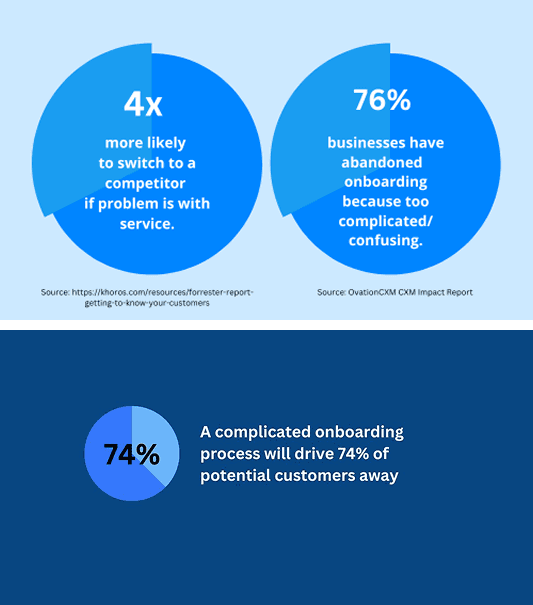
We identified four key challenges.
Our design focused on three main priorities.
01
Onboarding
Simplifying the onboarding process to make it easy and straightforward for parents
02
Trustworthy Experience
Create a safe, secure, and trustworthy experience that fosters meaningful connections for parents and kids.
03
Dashboard
Design a kid-friendly, gamified dashboard that brings all key features together for faster, easier navigation.
Inspiration & Sketches
To guide our design, we looked at similar platforms like Netflix and HBO Max, which manage family accounts with linked sub-accounts. This gave us ideas and helped shape key questions, such as: How can a parent securely log in or create an account? How can they set up sub-accounts for their spouse and children under one main account? How would a child access their own account safely? And importantly, how do we prevent kids from switching to the parent account, so they don’t get access to sensitive billing info?
Exploring these questions helped us sketch thoughtful solutions that balance security with ease of use.
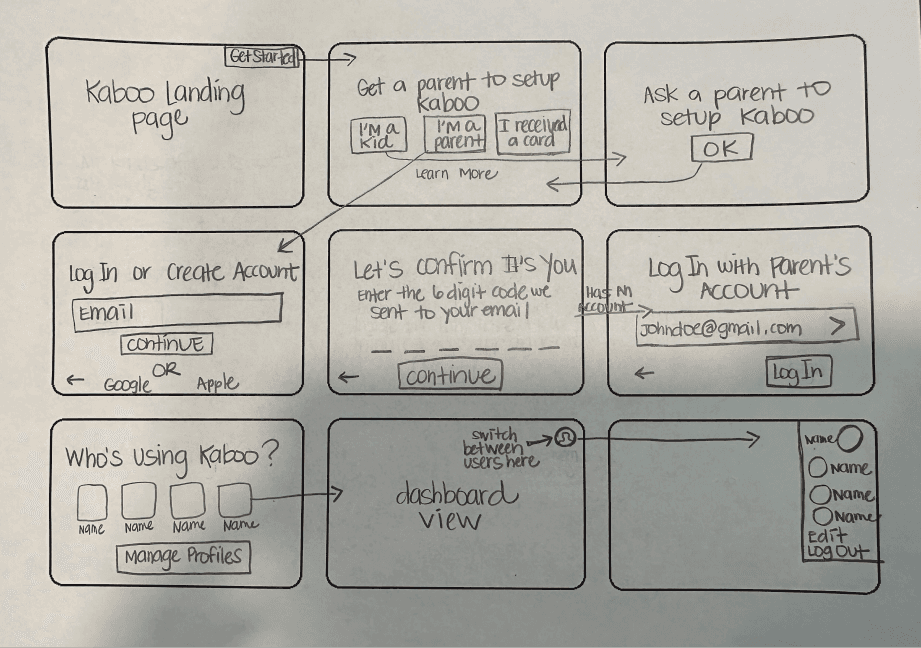
User Flow Diagrams
From the moment parents land on Kaboo, the journey is designed to inspire trust and momentum. They can register effortlessly—whether by linking an existing Google or Apple account, or through a quick email-and-password setup. Clear prompts, minimal steps, and gentle guidance make account creation feel easy yet secure. Within minutes, parents are through the gate and into the dashboard, ready to bring their family into Kaboo’s playful, connected world.

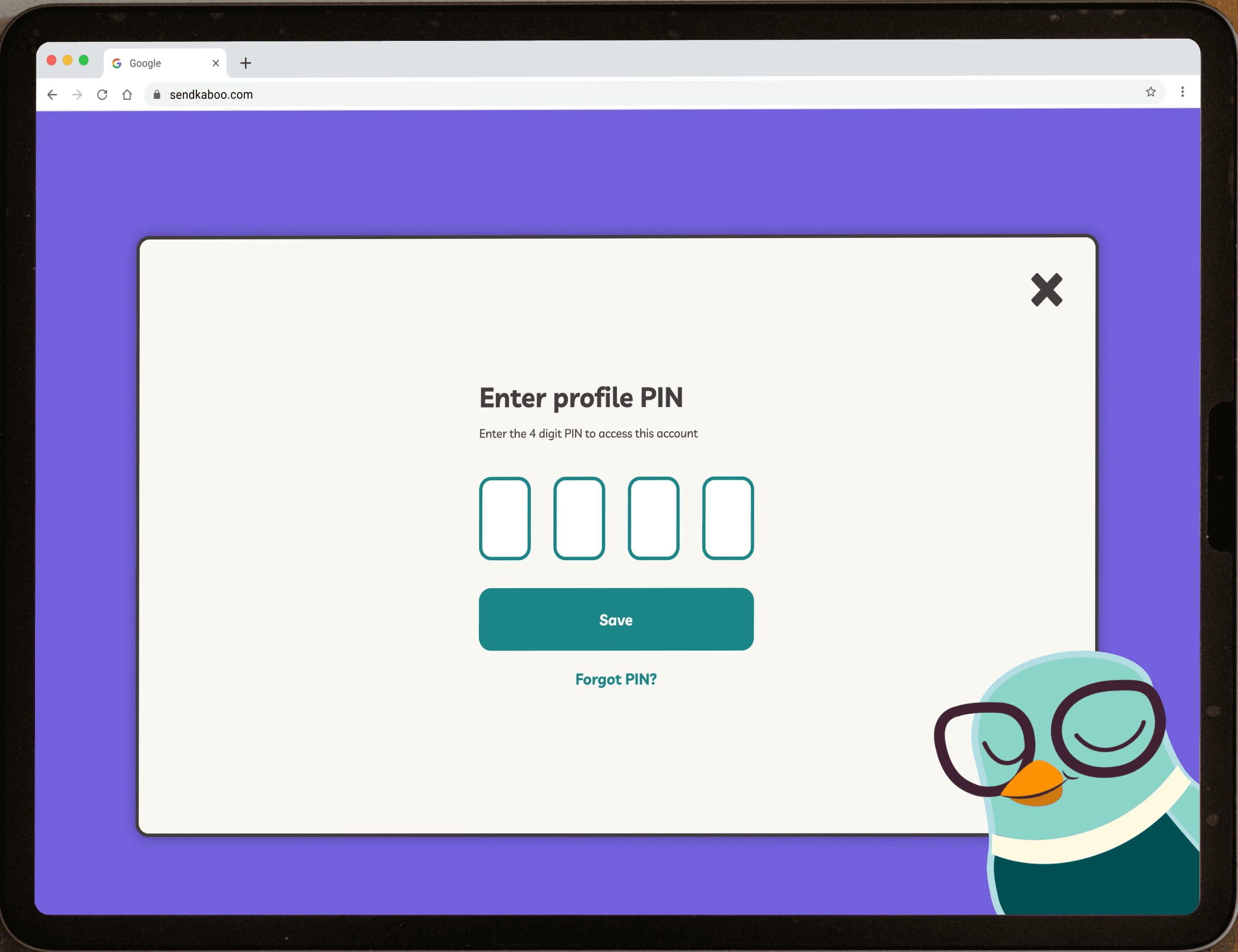
Once parents are set up, creating a child’s profile is quick, fun, and safe. From the dashboard, they can add a profile, choose an avatar, and give it a name—making the experience personal and inviting for their child. Optional details like date of birth help tailor the experience, while a secure 4-digit PIN ensures privacy and safety. In just a few steps, kids have their own space to explore Kaboo, with parents confident that it’s designed just for them.

Initial Wireframing
With the blueprint in place, our next challenge was bringing Kaboo’s warm, playful identity into a fully interactive design. Every screen—whether it was a parent creating their account, a child choosing an avatar, or a family managing profiles—was crafted to feel intuitive and welcoming.
We kept the visuals simple for adults, but sprinkled in moments of joy for kids: friendly mascots, and inviting colors. Safety remained at the heart of it all, with clear verification steps, secure PIN creation, and profile controls that gave parents peace of mind.
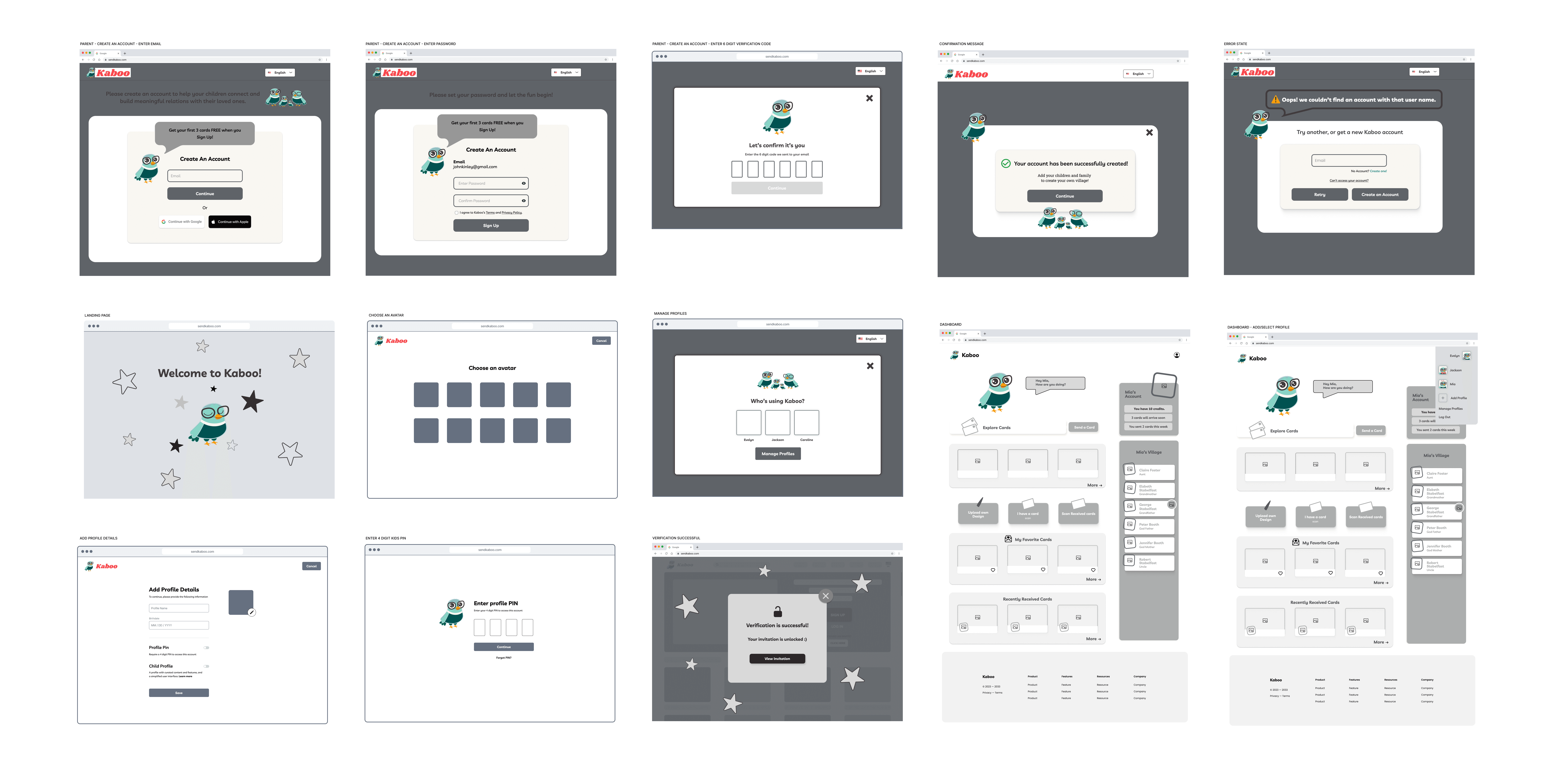
Design Solution
Onboarding
To address the challenges of security, usability, and trust, we redesigned Kaboo’s onboarding experience with a user-first approach. The solution balances robust security measures—like 6-digit verification codes and 4-digit PINs—with an intuitive, frictionless flow that guides users seamlessly through account setup.
By simplifying complex steps and providing clear, reassuring communication at every stage, we empowered families to create accounts confidently and quickly. This redesign not only strengthened data protection but also significantly reduced onboarding time, contributing to $2,426 in cost savings and 395 business days saved globally.
The result is a secure, trustworthy onboarding process that fosters meaningful connections while delivering measurable impact.
Dashboard Design
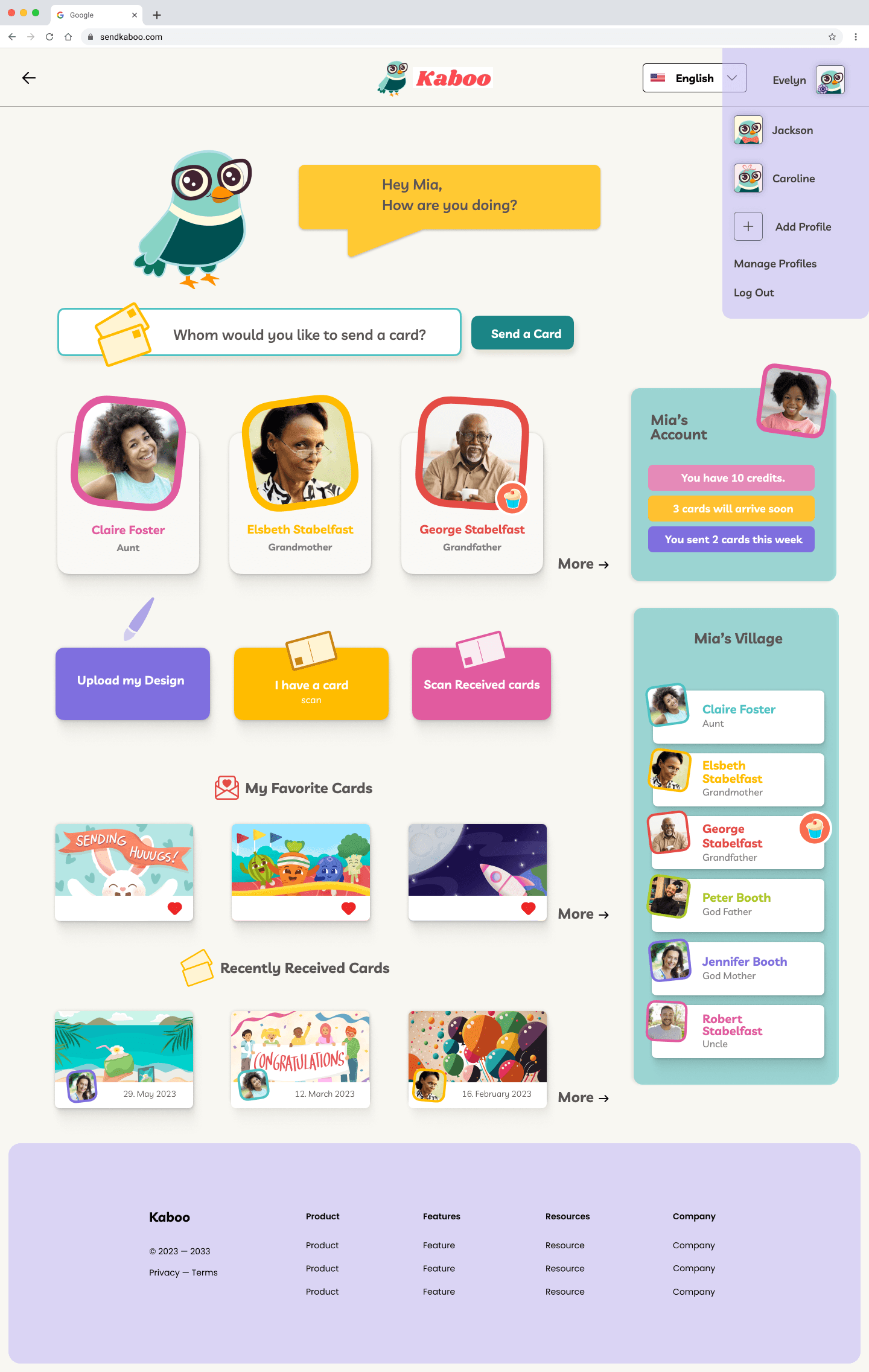
The dashboard is Kaboo’s welcoming starting point. For parents, it’s the place to check in, manage profiles, and keep things running smoothly. For kids, it’s a safe and colorful space to explore cards, find favorites, and jump back into activities they enjoy.
Everything is neatly organized—sections like Explore Cards, My Favorites, and Recently Accessed are always easy to find. Kaboo’s cheerful mascot pops in with tips and encouragement, making the experience warm, simple, and fun for the whole family.
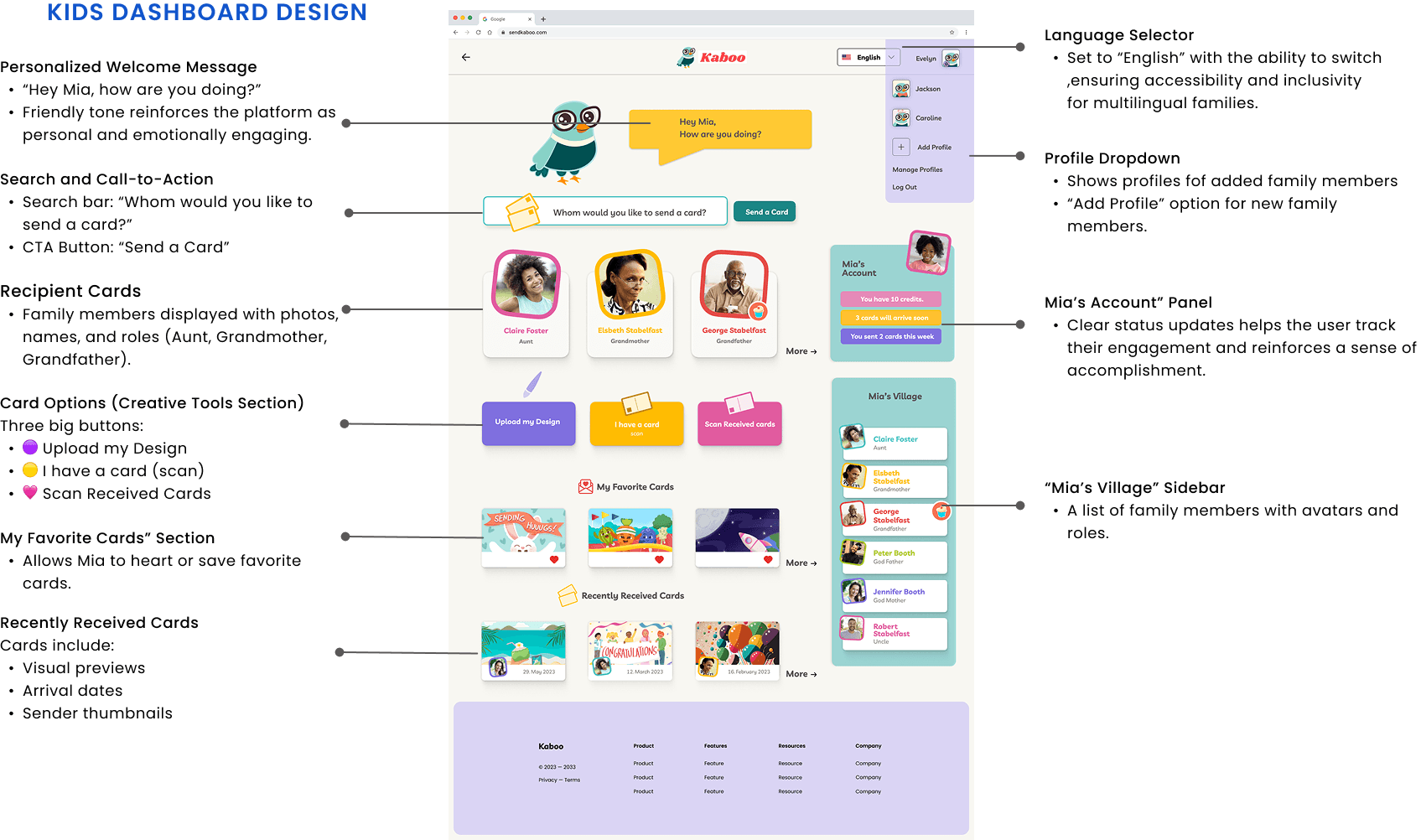
What we optimized for?
To ensure a secure and trustworthy onboarding experience, we prioritized both robust protection and seamless usability. Our design addressed:
Data Security – Implemented 6-digit verification codes, 4-digit PINs, and clear authentication flows to prevent unauthorized access.
User Confidence – Provided reassuring, transparent messaging at each step to build trust and reduce abandonment.
Frictionless Experience – Streamlined multi-step processes into intuitive, guided flows that minimized user effort while maintaining high security standards.
Inclusivity & Accessibility – Ensured compliance with WCAG standards and designed for diverse user needs, including non-technical family members.
This approach balanced safety, clarity, and speed, enabling users to complete onboarding confidently without feeling burdened by security requirements.
Trade-offs and Design decisions
In redesigning Kaboo’s onboarding, we carefully balanced competing needs:
Security vs. Speed: We prioritized strong security through verification codes and PINs to protect user data. Though these steps added friction, we optimized the flow and communication to keep the process as quick and reassuring as possible.
Gamification vs. Simplicity: While gamification could boost engagement for kids, we chose a clean, simple interface to avoid overwhelming parents managing multiple accounts. We included subtle playful elements to keep kids interested without compromising usability.
Multi-User Onboarding vs. Development Complexity: Supporting parents, kids, and relatives increased system complexity. To ensure a smooth launch, we focused on core multi-user flows and deferred more advanced features to later phases, balancing functionality with development efficiency.
What I learned?
01 Designing for families requires dual empathy
As designers, we had to balance the trust and control parents expect with the simplicity and playfulness kids need. This meant creating an interface that felt secure and reliable for adults, while being visually engaging and easy to navigate for children—bridging two very different user mindsets in one cohesive experience.
02 Balancing security with delight
We integrated email verification and password setup in a friendly, approachable manner—maintaining trust and safeguarding data without overwhelming young users or their parents.
03 Iteration needs real feedback
We recognized the value of early and consistent usability testing to validate assumptions and refine the experience. Without direct user input, we had to rely on educated guesses—missing opportunities to quickly iterate and improve based on real behavior and needs.
04 Early engineering collaboration matters
Involving engineers from the start would have surfaced technical constraints sooner, minimized design rework, and streamlined the handoff—enabling faster, smoother implementation.
more to explore.

Multimedia ART
Multimedia projects ranging from 3D design to posters, logos, and visual assets—bringing ideas to life through impactful visuals.

TripMate
Designed a conversational AI travel agent for personalized vacation planning